Technology News : Latest Tech News, New Gadgets, Mobile Phone, Laptop, Reviews: Mobile Phone

Hot

Post Top Ad

Your Ad Spot
Showing posts with label Mobile Phone. Show all posts

Thursday, 28 November 2019

Spain's Ministry of Defense bans Huawei devices from accessing sensitive information

November 28, 2019 0

While the US – China trade war rages on and the race for 5G (which China has already won, let’s be honest), Spain’s Ministry of Defense has banned access of all Huawei devices from its data servers (including employee emails). This is according to a report from La Informacion.

Although the Ministry is banning Huawei devices from specifically accessing sensitive information, it is not banning the use of Huawei devices for consumers. Members of the Ministry of Defense are still allowed to use their personal Huawei devices, but they must use other devices to access data from the Ministry’s servers, including emails. Those still using Huawei devices to access the server must ‘immediately disconnect’.
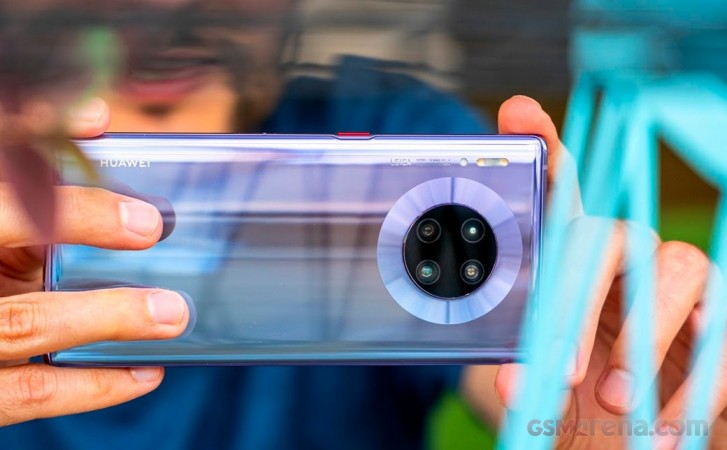
Huawei Mate 30 ProHuawei Mate 30 Pro

A reason for the ban was not cited, but with the US long accusing Huawei of espionage of users’ private data, we can only assume Spain’s reason is similar. Huawei has previously denied these accusations and even announced that it was suing the United States Government[1] for the unconstitutional ban of its hardware without due process.

A Huawei spokesperson told La Informacion that although Huawei has done business with more than 170 countries that it operates in within the last 30 years, it has never had a cyber-security related incident. “[Security] is the highest priority for the company” – translated from Spanish.

Although the Huawei Mate 30 Pro[2] remains without support of Google Services, Huawei managed to hold its number 2 position in smartphone shipments for Europe in Q3[3] and is steadily growing globally[4], but especially in China.

Source | Via[5][6]

References

  1. ^ that it was suing the United States Government (www.gsmarena.com)
  2. ^ Huawei Mate 30 Pro (www.gsmarena.com)
  3. ^ smartphone shipments for Europe in Q3 (www.gsmarena.com)
  4. ^ steadily growing globally (www.gsmarena.com)
  5. ^ Source (www.lainformacion.com)
  6. ^ Via (www.elespanol.com)


from GSMArena.com - Latest articles https://ift.tt/37MlfNJ
Read More

Google Pixel 2 updated with "Flip to Shh" via Digital Wellbeing Beta

November 28, 2019 0

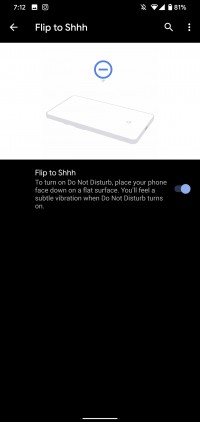
Here’s some good news for folks using a second-generation Google Pixel. The Pixel 2[1] and 2 XL[2] have gained a new feature called “Flip to Shh”. The feature debuted on the Pixel 3[3] and 3 XL[4] and lets users enable Do Not Disturb by simply flipping the phone upside down.

The feature was first noted by a Reddit user in the latest version of Digital Wellbeing Beta. Once installed, users can find it by heading to Settings > Digital Wellbeing. Conversely, it can be found under Settings > System > Gestures.

Flip to Shh on Pixel 4 XL

Users can participate in the Digital Wellbeing Beta by joining the program via the Google Play Store[5].

Source[6]

References

  1. ^ Pixel 2 (www.gsmarena.com)
  2. ^ 2 XL (www.gsmarena.com)
  3. ^ Pixel 3 (www.gsmarena.com)
  4. ^ 3 XL (www.gsmarena.com)
  5. ^ Google Play Store (play.google.com)
  6. ^ Source (www.reddit.com)


from GSMArena.com - Latest articles https://ift.tt/2OS8CYR
Read More

Black Friday: Realme, Xiaomi and ZTE also have some tempting offers

November 28, 2019 0

The end of November is always associated with marquee markdowns in various product categories including smartphones. We’ve already seen several Black Friday deals from various manufacturers and we have some more to add with devices from Realme, Xiaomi and ZTE.

Realme Europe is giving €10 discounts across its lineup, the budget Realme 5[1] starts at €159, there’s also the 5 Pro[2] which goes for €189 in its 4/128GB trim. The X2 is down to €289 and the X2 Pro[3] starts at €389. All these offers are currently live on Realme’s European site and will be on offer until December 2 or while stocks last.

Deals: Realme, Xiaomi and ZTE also have some tempting Black Friday offers

Realme India is also discounting a bunch of its products starting on November 29 - deals include INR 1,000 off the Realme 3[4], Realme X[5] and Realme 5 Pro. These offers are live on the company’s official website as well as through Flipkart.

Xiaomi Spain is also getting in on the discount run with limited offers on the Redmi 7A[6] which is down to just €89 in its base 2/32GB configuration. There’s also the Redmi Note 7[7] which now starts at €159 for the 4/64GB variant. The Mi 9[8], Mi 9 Lite[9] and Mi 9T[10] are also getting discounts which range from €60 all the way to €150.

Xiaomi Spain sales Xiaomi Spain sales Xiaomi Spain sales
Xiaomi Spain sales

ZTE US is offering a $100 discount, free shipping and a case for the Axon 10 Pro[11] and $50 off on the Blade 10[12] is now just $129.

Deals: Realme, Xiaomi and ZTE also have some tempting Black Friday offers

Realme Europe sale | Realme India sale | Xiaomi Spain sale | ZTE US sale[13][14][15][16]

References

  1. ^ Realme 5 (www.gsmarena.com)
  2. ^ 5 Pro (www.gsmarena.com)
  3. ^ X2 Pro (www.gsmarena.com)
  4. ^ Realme 3 (www.gsmarena.com)
  5. ^ Realme X (www.gsmarena.com)
  6. ^ Redmi 7A (www.gsmarena.com)
  7. ^ Redmi Note 7 (www.gsmarena.com)
  8. ^ Mi 9 (www.gsmarena.com)
  9. ^ Mi 9 Lite (www.gsmarena.com)
  10. ^ Mi 9T (www.gsmarena.com)
  11. ^ Axon 10 Pro (www.gsmarena.com)
  12. ^ Blade 10 (www.gsmarena.com)
  13. ^ Realme Europe sale (event.realme.com)
  14. ^ Realme India sale (event.realme.com)
  15. ^ Xiaomi Spain sale (event.mi.com)
  16. ^ ZTE US sale (www.zteusa.com)


from GSMArena.com - Latest articles https://ift.tt/2ruudyG
Read More

Apple may use Samsung OLED panels exclusively for the 2020 iPhone Pro models

November 28, 2019 0

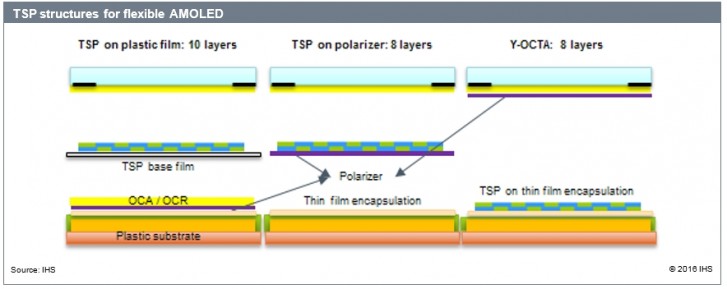
Samsung may have finally succeeded in talking Apple into using its Y-OCTA OLED panels. Last year there were rumors[1] that the 2019 generation iPhones will make the jump, but that didn’t come to pass. Now, ETNews reports that Samsung will be the exclusive OLED supplier for the 5.4” and 6.7” iPhones.

The Y-OCTA technology uses on-cell touch sensing, so it doesn’t require a separate touch-sensitive layer. This makes the display panel thinner and cheaper to manufacture (having fewer layers can reduce glare to boot).

According to ETNews, Samsung is the only company that can mass produce such panels at the scale Apple needs them. In fact, yield may have been the reason the deal didn’t happen sooner – 2018 iPhones were also rumored to use Y-OCTA, but Cupertino reportedly pulled back because wasn’t happy with the yields.

Apple may use Samsung OLED panels exclusively for the 2020 iPhone Pro models

Anyway, Apple is expected to launch two more phones next year – iPhone SE 2 using a 4.7” LCD and the iPhone 12 non-Pro with a 6.1” OLED.

Unlike the Pro models, Apple will source OLED panels for the iPhone 12 from both Samsung and LG. This means two things – no on-cell touch for the 6.1” phone and BOE is likely out as a potential supplier.

Samsung has been using Y-OCTA panels on its own phones since the Galaxy Note7[2]. The Galaxy S8 also made the switch while the larger S8+ stuck with old-school panels.

Source[3]

References

  1. ^ rumors (www.gsmarena.com)
  2. ^ since the Galaxy Note7 (www.gsmarena.com)
  3. ^ Source (english.etnews.com)


from GSMArena.com - Latest articles https://ift.tt/34w559m
Read More

Samsung Galaxy Note10 Lite's S Pen will have Bluetooth, FCC confirms

November 28, 2019 0

The Samsung Galaxy Note10 Lite will have a Bluetooth-enabled S Pen. It remains to be seen whether it will have the advanced functionality of the latest flagship model (i.e. the gyroscopic controls) or the more basic controls of the Note9 (e.g. a wireless shutter key for the camera).

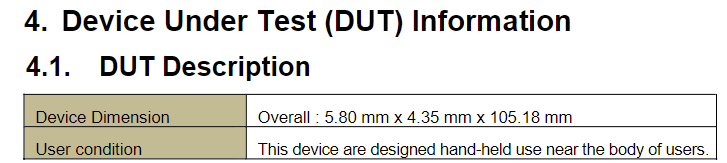
FCC’s documents reveal the dimensions of the stylus, 5.80 x 4.35 x 105.18mm, which is identical to the Note10 stylus and slightly larger than that of its predecessor. Of course, this could be just for ergonomics rather than for the additional gyro hardware.

FCC docs reveal Galaxy Note10 Lite's S Pen will have Bluetooth, suggest reveal date

It’s also interesting to note that the FCC is withholding external photos of the S Pen until May 25 next year, which suggests a time frame for the Galaxy Note10 Lite unveiling. That’s nine months after the Note10 flagships were unveiled, right in the fourth quarter of a model’s life cycle when sales are in a steep decline.

FCC docs reveal Galaxy Note10 Lite's S Pen will have Bluetooth, suggest reveal date

Also, it’s three months after the Galaxy S11 phones, which are expected in February[1]. Such a time frame means that the Note10 Lite will not get in the way of the big dogs and will have an opportunity to boost Samsung sales after the S11 launch buzz has cooled off.

Source | Via[2][3]

References

  1. ^ in February (www.gsmarena.com)
  2. ^ Source (fccid.io)
  3. ^ Via (twitter.com)


from GSMArena.com - Latest articles https://ift.tt/2KV5gmX
Read More

Wednesday, 27 November 2019

Apple iPhone 11 Smart Battery Case torn down via x-ray

November 27, 2019 0

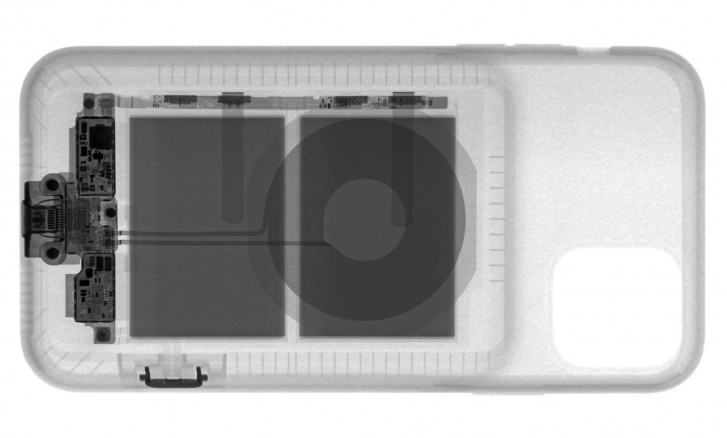
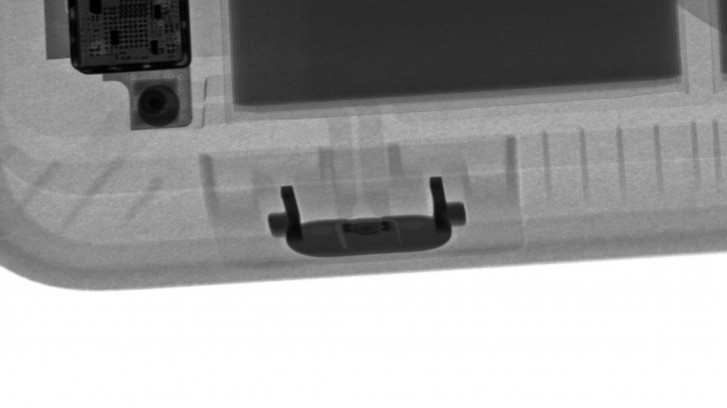
The newest lineup of Apple’s iPhone Smart Battery Cases launched last week[1] and offer a dedicated camera button in the case so you can quickly fire up the iPhone 11[2]’s camera. The folks over at iFixIt did some digging to find out exactly how the Battery Case is wired so rather than physically and manually taking it apart, they found x-ray (thanks to Creative Electron) to reveal just as much.

The x-ray images reveal two smaller batteries, and the wireless charging coil, all connected to a circuit board at the bottom of the case.

via Creative Electronvia Creative Electron

Then there’s the dedicated camera button, a new addition to this year’s Smart Battery Cases. The button is concave enough to prevent accidental presses or confuse it for the power key.

via Creative Electronvia Creative Electron

The x-ray images show how the extra button was added to the case. It is connected to the circuit board directly with a flexible cable. The signal is then passed to the connected phone via the lightning connection.

Source

References

  1. ^ launched last week (www.gsmarena.com)
  2. ^ iPhone 11 (www.gsmarena.com)


from GSMArena.com - Latest articles https://ift.tt/2QSA8Iw
Read More

Samsung Israel's Android 10 roadmap points to January release for Galaxy S10 and Note10

November 27, 2019 0

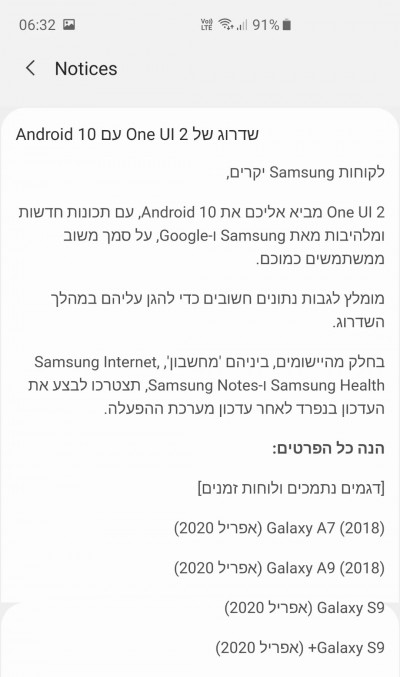
Samsung’s roadmap has been revealed to customers in Israel via the Samsung Members app. The roadmap lists several Galaxy smartphones expected to receive the Samsung One UI 2.0 update based on Android 10. Both the Samsung Galaxy S10[1] and Note10[2] have ongoing Beta programs[3].

According to this roadmap, the Galaxy S10, Note10, and Note9[4] will receive the One UI 2.0 stable release in January while the Galaxy S9[5] will see it in April. Of course, this is according to Samsung Israel, whose roadmap may not necessarily line up with other major markets like the US and the UK.

Samsung Galaxy S10 and Galaxy Note10+Samsung Galaxy S10 and Galaxy Note10+

Last month, Google listed manufacturers that would ship Android 10 updates by the end of the year. “Manufacturers such as ASUS, LG, Motorola, OPPO, Realme, Samsung, Sharp Sony, Transsion and Vivo have all committed to updating some of their devices to Android 10 by the end of the year.” It’s entirely possible that we may see Samsung devices get Android 10 before 2020, but it certainly won’t happen in Israel.

Most midrange devices are expected to get the update in April, as per the Israeli roadmap. The Galaxy A50[6] and A70[7] are the only two expected to see the update in April.

Samsung Israel’s Android 10 roadmap points to January release for Galaxy S10 and Note10Via SamMobile

As Samsung Israel seems to be the first one, it shouldn’t be too long before another roadmap is posted for other markets where Samsung sells Galaxy phones.

Head to the link below to see the full roadmap for Israel.

Via[8]

References

  1. ^ Samsung Galaxy S10 (www.gsmarena.com)
  2. ^ Note10 (www.gsmarena.com)
  3. ^ ongoing Beta programs (www.gsmarena.com)
  4. ^ Note9 (www.gsmarena.com)
  5. ^ Galaxy S9 (www.gsmarena.com)
  6. ^ Galaxy A50 (www.gsmarena.com)
  7. ^ A70 (www.gsmarena.com)
  8. ^ Via (www.sammobile.com)


from GSMArena.com - Latest articles https://ift.tt/2XPWCLw
Read More

Samsung Galaxy  Fold gains DeX on PC feature with latest software update

November 27, 2019 0

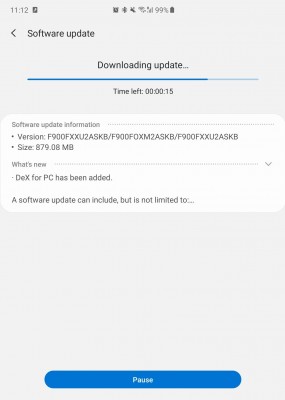
The latest update for the Samsung Galaxy Fold[1] enables DeX on PC. This mode allows you to connect the phone to your Windows or Mac computer via a USB cable and use the computer’s monitor, keyboard and mouse.

This means you can edit Office documents using a full size keyboard or game with the extra accuracy of a computer mouse. Plus, it’s easy to drag and drop files between the two devices.

Note that the Galaxy Fold already supported the DeX mode where it connects directly to a monitor. However, unless you have a dedicated monitor (and keyboard/mouse) for the Fold, DeX on PC is more convenient – just download the app[2], plug the Fold into your computer and you’re good to go.

The latest update for the Samsung Galaxy Fold enables DeX on PC

The update (which weighs around 900MB) brings the phone up to version F900FXXU2ASKB. A similar update for the Galaxy Fold 5G[3] should be close behind too.

Source[4]

References

  1. ^ Samsung Galaxy Fold (www.gsmarena.com)
  2. ^ download the app (www.samsung.com)
  3. ^ Galaxy Fold 5G (www.gsmarena.com)
  4. ^ Source (www.sammobile.com)


from GSMArena.com - Latest articles https://ift.tt/37Fp1bU
Read More

Xiaomi introduces Mi Rabbit Children's Watch 2S in China

November 27, 2019 0

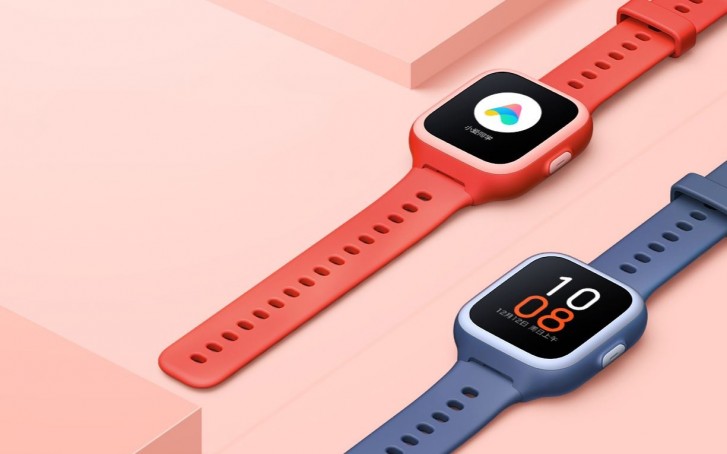
Xiaomi unveiled[1] its first Mi Watch earlier in the month which aims to compete with traditional smartwatches. Now, the brand is focusing on a different segment with the Mi Rabbit Children’s Watch 2S. As the name implies it’s a smartwatch targeted at children and brings all the basic smartwatch features in a round plastic body which weighs just 44 grams.

Xiaomi introduces Mi Rabbit Children’s Watch 2S in China

The display comes in at 1.3-inches with a 240x240 pixel resolution. Unlike more expensive offerings, the Mi Rabbit 2S has an IPS panel instead of an AMOLED one. The watch is IPX8 waterproof and has a nano-SIM slot for cellular connection. There’s also Wi-Fi and GPS on board as well as a single loudspeaker. The battery comes in at 600 mAh and is rated for 7 days of standby.

Xiaomi introduces Mi Rabbit Children’s Watch 2S in China

The Mi Rabbit Children’s Watch 2S will retail for CNY 199 ($28) starting today at Xiaomi Mall in China. There is no word on international availability for now.

Mi Rabbit Children's Watch 2S in Red and Blue Mi Rabbit Children's Watch 2S in Red and Blue
Mi Rabbit Children's Watch 2S in Red and Blue

Source (in Chinese) | Via[2][3]

References

  1. ^ unveiled (www.gsmarena.com)
  2. ^ Source (item.mi.com)
  3. ^ Via (www.gizchina.com)


from GSMArena.com - Latest articles https://ift.tt/37Iuf6w
Read More

Black Friday: select Nokia models come with a gift card in India

November 27, 2019 0

It has been 3 years since HMD took on the Nokia mantle. To celebrate the occasion, the Nokia online store in India is running a special promotion this week - select Nokia models come with a gift card worth up to INR 5,000.

You can find the participating models at Nokia.com[1]. It’s mostly the newer “.2” phones, but there are a few “.1” entries as well.

Black Friday: select Nokia models come with a gift card in India

The gift card you get for each model is different, e.g. the Nokia 7.2[2] nets you an INR 5,000 card while the Nokia 8.1[3] only gets INR 2,000. The 6.1 Plus[4] and 5.1 Plus[5] also get the biggest gift card.

This deal is valid until 7:30pm on December 1 (this Sunday). Just don’t forget to use the code GIFTCARD at checkout.

References

  1. ^ at Nokia.com (www.nokia.com)
  2. ^ Nokia 7.2 (www.gsmarena.com)
  3. ^ Nokia 8.1 (www.gsmarena.com)
  4. ^ 6.1 Plus (www.gsmarena.com)
  5. ^ 5.1 Plus (www.gsmarena.com)


from GSMArena.com - Latest articles https://ift.tt/33o07ds
Read More

Tuesday, 26 November 2019

Hollywood actor Ryan Reynolds buys ownership in Mint Mobile

November 26, 2019 0

Today, Mint Mobile has a new owner. Famous movie actor Ryan Reynolds has purchase ownership stake in the US carrier. The California-based network offers low-cost data plans with unlimited talk and text to folks who bring their own phones to the network. Mint Mobile is an MVNO that operates on T-Mobile’s nationwide LTE network.

Hollywood actor Ryan Reynolds buys ownership in Mint Mobile

Mint Mobile currently offers a promotion of $45 for three months of service with 12 GB of data per month. You renew your service by paying for a few months at a time, up to 12 months. After the promotional rate, it’ll cost $75 to renew the 12 GB plan for three months. Honestly, their pricing structure can be a bit confusing so make sure you do enough research.

It’s a bit unconventional which is why I like it. Celebrities generally invest in high-end products like skincare brands or delicious gin companies. Yet Mint is making wireless way more affordable at a time when the average American is paying 65 dollars a month. I’m excited to champion a more practical approach to the most essential technology. – Ryan Reynolds

“Mint Mobile’s consumer-centric approach and maniacal focus on generating consumer value has kicked Mint into hyper-growth mode. It’s fitting that the most disruptive wireless company is now owned by the most innovative marketer on the planet,” explained Mint CEO David Glickman.

Reynolds will help Mint’s communication team, marketing efforts, and strategic decision making. Reynolds starred in both Detective Pikachu and Deadpool as their respective protagonists.

Source[2]

References

  1. ^ November 25, 2019 (twitter.com)
  2. ^ Source (www.globenewswire.com)


from GSMArena.com - Latest articles https://ift.tt/2rmI4Ho
Read More

Xiaomi Mi Note 10 is headed to India

November 26, 2019 0

Xiaomi's Mi Note 10[1] is definitely one of the most intriguing smartphones of the past few months, with its unique camera setup and seemingly all-high-end features aside from the chipset.

The device has so far launched in China (under a different name[2]) and Europe, and it looks like it will be finally headed to India very soon. Xiaomi's official Twitter account for the subcontinent has confirmed this with what amounts to the start of its teaser campaign for the launch of the Mi Note 10 in India.

Unfortunately this first teaser doesn't say anything about exactly when the Mi Note 10 will get introduced in that market, but we're betting that more information will come soon, so stay tuned for that. And in the meantime, why not take a look at our in-depth review[5] of the Mi Note 10?

References

  1. ^ Xiaomi's Mi Note 10 (www.gsmarena.com)
  2. ^ under a different name (www.gsmarena.com)
  3. ^ #108MP (twitter.com)
  4. ^ November 25, 2019 (twitter.com)
  5. ^ our in-depth review (www.gsmarena.com)


from GSMArena.com - Latest articles https://ift.tt/33k8u9V
Read More

Google details incoming Ambient Mode in latest video

November 26, 2019 0

Dubbed “Android’s proactive Google Assistant”, Ambient Mode is a new feature of Google Assistant headed to select Android devices on Android Oreo (8.0) and above. We’ve seen hints of an ambient interaction with Google Assistant back in July[1] in earlier builds of the Google App.

Today, Google released a video that explained a little more about what Ambient Mode is. Arvind Chandrababu, Google Product Manager for Google Assistant, explains what the intent of the new mode is and some of the ways it can help get things done.

The ultimate goal for proactive Assistant is to help you get things done faster, anticipate your needs and accomplish your tasks as quickly and as easily as possible.

Apart from showing you your upcoming events and contextual weather information, you have quick access to smart devices, and you can create a custom wallpaper slideshow like on a Nest/Google Home display.

Ambient Mode is integrated into the Android OS, which suggests we might see Ambient Mode on devices from many different OEMs.

The video doesn’t go into too much detail about the specific things you’ll be able to do with Ambient Mode, but the feature has been rolling out to Nokia and Xiaomi devices over the last couple of weeks or so.

Source[2]

References

  1. ^ back in July (www.gsmarena.com)
  2. ^ Source (youtu.be)


from GSMArena.com - Latest articles https://ift.tt/2DcM1kz
Read More

Monday, 25 November 2019

Checking in with Corning: the status of foldable glass

November 25, 2019 0

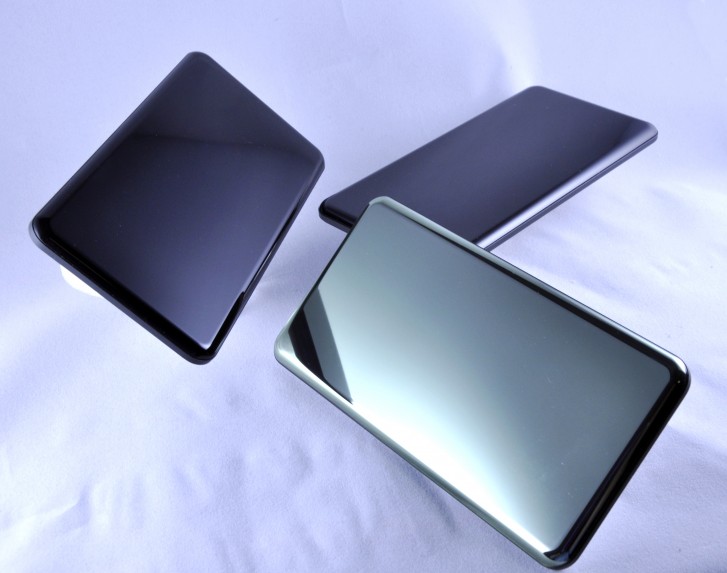
Last week, we had the chance to talk to Scott Forrester, Division Vice President, Marking and Innovation Products at Corning. The company offered us a look at Corning’s history of glass and ceramic manufacturing, along with insight on the production of Gorilla Glass for smartphones.

Checking in with Corning: status of foldable glassCorning Incorprated

We had a chance to ask questions about Gorilla Glass and how Corning strikes a balance between scratch resistance and durability against shattering. We also asked about the progress of using flexible glass in foldable smartphones.

Finally, we checked in with Corning on its thoughts about Sapphire glass. If you remember, there were a few devices that used this more expensive but highly scratch-resistant glass like the HTC U Ultra Sapphire Edition, the rugged Kyocera Shield, and the Apple Watch Edition.

Introduction and brief history of Corning

Corning has been around since 1851 and it was first known as Corning Glass Works when it opened in Somerville, Massachusetts as glass became a more common raw material. Its first patent in 1877 was for railroad signal lenses with a smooth exterior that didn’t gunk up over time. In 1879, it developed the glass around the first Edison carbon filament before inventing a way to mass produce these bulbs.

Corning IncorpratedCorning Incorprated

In 1915, Corning started the PYREX brand of glass cookware and would go on to mass-produce TV tubes in the 1940s, making TVs more affordable. In 1964, Corning scientists would invent a new process of forming glass in 1964 called “fusion overflow” that made ultra-flat panes pristine glass and would eventually become the process for LCD screens later in the 2000s.

In 2007, Corning’s CEO was contacted by Steve Jobs with specifications to develop a durable, thin, and lightweight glass for the first iPhone - this would be called Gorilla Glass. Over the last decade, Corning gradually developed thinner and lighter Gorilla Glass while retaining the same shatter and scratch resistance.

Today, Corning is continuously researching new glass compositions that could help make glass more resistant to scratches and drops. Now Corning is developing glass that could be used in the future generation of foldable smartphones.

Aside from consumer electronics, Corning manufactures glass for a wide variety of applications including optical fiber for high-speed communications, glassware for pharmaceuticals, manufacturing and packaging, and emissions-control products in the automotive industry. Corning employs 50,000 workers at 70 manufacturing and research facilities throughout North America, Europe, and Asia.

State of foldable glass, scratch vs drop, and whatever happened to sapphire glass

Foldable phones made their debut this year and based on the past several months, we have a feeling the trend is here to stay. These displays are all currently covered in plastic since it's immediately available and easy to mold to the foldable form factor. The downside to plastic is that it scratches much easier than glass.

Glass would make for a more durable layer of protection over a foldable screen, but is it even possible to make glass that folds this way?

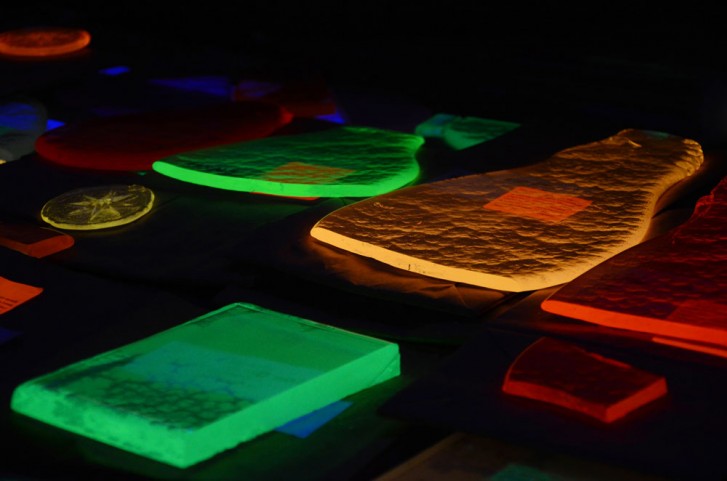
There is a lot of science at play in making glass and its chemical makeup and forming process are what dictates the characteristics that the glass will have when competed. Glass can be dense, thin, thick, brittle, and even cloudy.

Checking in with Corning: status of foldable glassCorning Incorprated

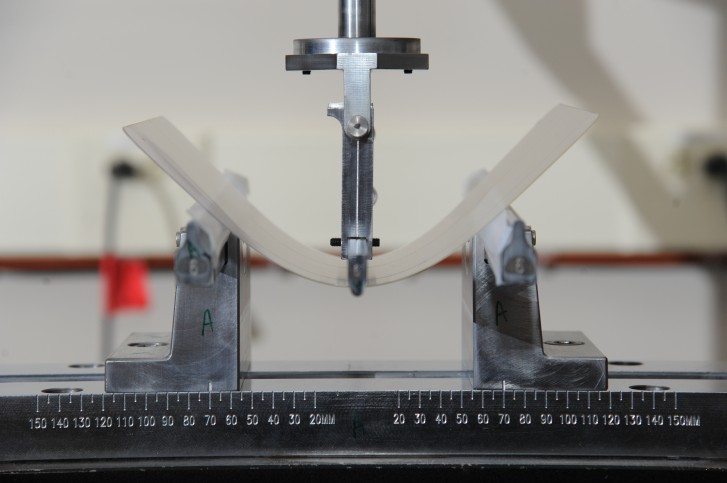
Corning has a lot of experience with very thin glass. It has developed a solution about as thick as a human hair at 100 microns, which becomes flexible to a certain degree. Corning has been working with OEMs to develop prototypes for future folding devices and it plans to have some working glass designs in 12 to 18 months.

The challenge with glass in this application is that the folding form factor has a lot of variables (i.e. bending radius, impact resistance, and thickness) that need to be finalized so the glass can conform to this particular purpose. Since there is no standardized folding phone form factor, Corning needs time to figure out which compositions of glass will be the best for the application.

Checking in with Corning: status of foldable glassCorning Incorprated

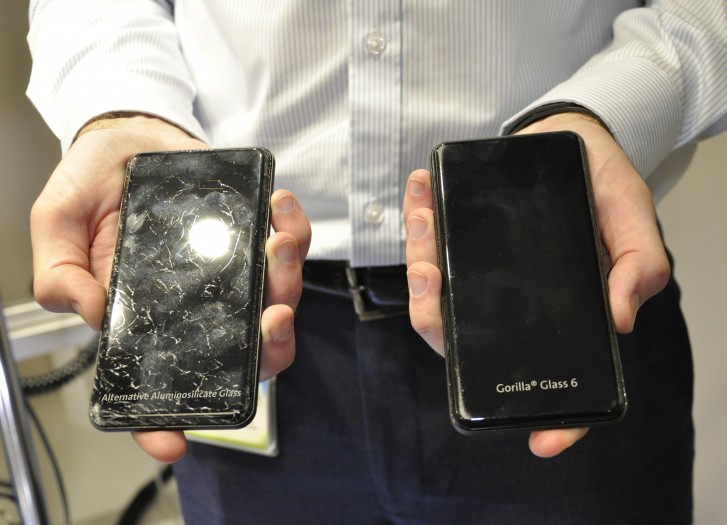
Glass doesn’t break necessarily because its weak; glass breaks when stress is applied to a flaw or imperfection in the glass. Over time and use, the composition of Gorilla Glass deteriorates at a microscopic level, which explains why your phone may have survived the first eight drops but breaks on the ninth.

With every version of Gorilla Glass, drop resistance improves but scratch resistance eventually reaches a threshold. The density and thickness of glass can be altered, but hardness (resistance to scratching) is an integral property of glass. Drop resistance can be improved, however, by altering the makeup of the glass and parameters of the forming process.

Checking in with Corning: status of foldable glassCorning Incorprated

In the more recent years, Gorilla Glass was formed with curved edges to be used on phones like the Galaxy S7 edge and the OnePlus 7 Pro. This is something that could never be done with sapphire glass – which isn’t malleable the way Gorilla Glass is.

Checking in with Corning: status of foldable glassCorning Incorprated

Back in 2013, there was a sudden interest in sapphire glass for use in smartphone displays. It was a much harder material that was significantly more resistant to heavy scratching and it was once believed it would replace glass on most smartphone displays.

It didn’t exactly go that way. Sapphire glass turned out to be far more expensive to manufacture and its composition doesn’t allow it to be formed with curved edges.

Corning explains that sapphire glass finds great success in smaller formats like high-end watches. However, a larger piece of sapphire glass implemented for use in a smartphone display would make it more prone to shattering, since smartphones are subjected to tumbles and falls more so than, say, a wristwatch. Smartphone glass is under constant tension, thus not an ideal application for this kind of glass.

Wrap-up

We write about a lot of smartphones here at GSMArena, which means a lot of glass has passed through the office and we’ve touched a lot of it over the years. Though there are a few manufacturers that make glass for smartphones, Corning is the most popular brand found in over 7 billion consumer devices by over 45 major OEMs.

Smartphone glass is something that we don’t really think about – it’s virtually invisible. We sometimes only notice it when it gets scratched or cracks completely. Glass is an ideal material for these mini super-computers because it is durable and more scratch resistant than plastic.

Checking in with Corning: status of foldable glassCorning Incorprated

A shift happened in the last few years where OEMs decided to use glass on both sides of devices, thus making devices (arguably) more fragile than their metal-clad predecessors.

Though this may be one downside to using glass in smartphones, it’s a fully transparent material that allows light and radio signals to pass freely and without interference. Not only that, but it also allows for wireless charging while also being durable and attractive. It sure makes things easy for the manufacturer but what about the consumer? I’ll still argue OEMs should at least try to bring back smartphones with metal bodies, but maybe consumers are too deep into wireless charging these days.

Checking in with Corning: status of foldable glassCorning Incorprated

If you’re a clumsy person and your smart device’s glass somehow keeps surviving your drops, you have great luck. If that next drop takes the glass over the edge of its life, just recall all those times that the glass didn’t break.


from GSMArena.com - Latest articles https://ift.tt/35zTwOH
Read More

Week 47 in review: Galaxy S11 rumors, Realme 5s official, new ColorOS, Redmi K30 leaks

November 25, 2019 0

Week after week it becomes clear that we can't get enough of the Samsung Galaxy S11, even though we are still three months away from its launch.

Most of the rumored information about Samsung's February of 2020 flagship comes from decoding the beta One UI 2.0 software. It uncovered that the Galaxy S11 will have a 120Hz screen and a 108MP camera, along with features such as Director's View, Night Hyperlapse and Vertical Panorama. The other rumors are based on unconfirmed info from the supply chain, which claims the Galaxy S11 will have slimmer bezels than the Galaxy Note10+, along with 25W fast charging.

Other rumors[1] claim that the Galaxy S11 and S11+ will have 6.7-inch and 6.9-inch displays, while the S11e will have either a 6.2-inch or 6.4-inch screen. As for cameras the Galaxy S11 will boast a 108MP main camera, a 48MP telephoto with 10x lossless zoom, another telephoto with 5x optical zoom by way of a persicope design and an ultrawide to finish the setup.

In other Samsung-related news, the Galaxy A71 appeared in renders, revealing a quad-camera and an Infinity-O AMOLED. The other story is the announcement of the Star Wars Edition Galaxy Note10+.

The Motorola Razr foldable, which became official last week, will cost €1,600 in Europe and will go on pre-order on December 4.

The Realme 5s went official - the Realme 5 brings a new 48MP main camera and a red paint job, alongside an increase in the base storage.

Oppo showed off a complete redesign of its ColorOS. Now in its 7th iteration ColorOS brings rounded icons with a lighter palette, a refined system-wide dark mode, new animations, a new extreme night mode and super anti shake camera modes and much more[2]. ColorOS 7 will premiere on the Oppo Reno3, which was teased at the event.

An alleged roadmap surfaced, suggesting there are 4 flagship Xperia smartphones and 3 midrangers coming next year.

The OnePlus 8 Pro could have a quad-camera setup and a dual selfie camera in the display itself, as per a leaked diagram.

The final big story was a live image leak of the Redmi K30, which confirmed a 120Hz screen and 30W charging.

See you next week!

Samsung Galaxy S11 to bring Director's View, Night Hyperlapse and slimmer bezels

The new camera modes were unearthed in One UI 2.0 beta code.


Oppo unveils ColorOS 7 and teases Reno3

Oppo is bringing a total makeover to its custom Android interface.


Samsung Galaxy S11 to have a 120 Hz display

A hidden setting was found in the latest Beta build of One UI that suggests a future device with support for higher refresh rates.


Samsung Galaxy A71 appears in renders: L-shaped quad camera and Infinity-O AMOLED display

The design is quite similar to the recently leaked Galaxy A51.


Alleged roadmap suggests 4 flagship Sony Xperias alongside 3 midrangers in 2020

Sony is gearing up for a big 2020 with its revised Xperia lineup.


Samsung Galaxy S11 5G confirmed to come with 25W fast charging

An improvement over the S10 series but still not on par with the Note10+.


Alleged OnePlus 8 Pro diagrams leak with a quad-camera setup

The overall design looks like a OnePlus 7 Pro with a hole-punch selfie camera.


Xiaomi Redmi Note 8 Pro will get Android 10 any moment now

The phone was spotted on Geekbench with the latest OS version.


Samsung unveils Star Wars Edition Galaxy Note10+ bundled with Galaxy Buds

The Special Edition comes in time for an upcoming Star Wars movie.


Realme 5s unveiled with 48MP main camera, more base storage and new paint job

Other than that, the phone is identical to the original Realme 5.


Motorola Razr 2019 European prices leak

Sweden will be among the first countries where the new Razr goes on sale.


Apple removes all user reviews and ratings from its website

Apple no longer trusts its own customers’ ratings to display them publicly.


Apple releases Smart Battery Case for the iPhone 11 series

Available for iPhone 11, iPhone 11 Pro and iPhone 11 Pro Max.


European pre-orders for the Motorola Razr 2019 start next month, here's the price

Only a few countries have been confirmed to get the reimagined foldable phone.


Redmi K30 live images leak, 120 Hz screen and 30W charger confirmed

The phone ihas a Snapdragon 730 chipset, with a flagship SoC reserved for the Pro variant.


Android's camera app exploit can be used to spy on users

Most OEMs should have patched it by now, though.


References

  1. ^ Other rumors (www.gsmarena.com)
  2. ^ much more (www.gsmarena.com)


from GSMArena.com - Latest articles https://ift.tt/37AMpHm
Read More

Flux Beamo laser engraver review

November 25, 2019 0

Introduction

Now, Laser cutters and engravers are not our usual forte. Yet having acquired a few around the office for various reasons recently, we have been fairly immersed and quite interested in the field. And having seen a few decent reviews, we thought we'd share our impressions by this latest one Beamo, which we found particularly exciting.

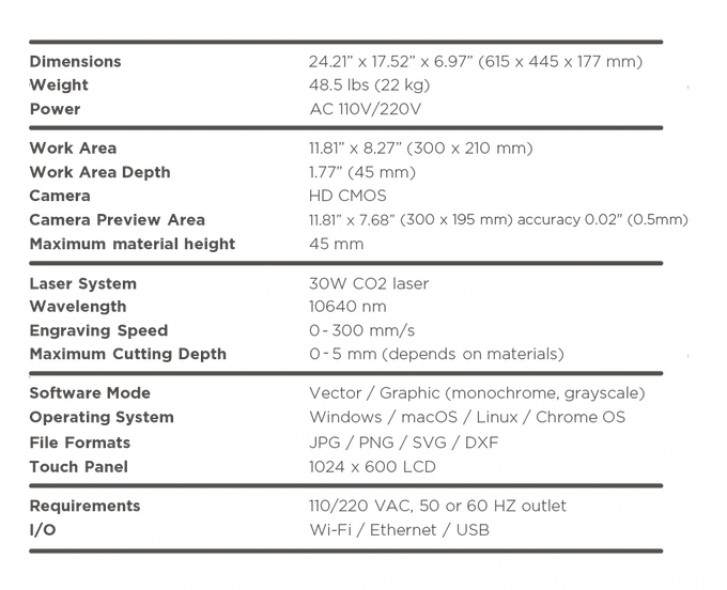
It's the latest project by Flux - a company that first made a name for itself with the sub $1000 Delta personal 3D printer. On paper, Beamo is a pretty powerful 30W CO2 laser cutter and engraver, with impressive 1,000 DPI resolution, a relatively portable form factor at sub $1000 price tag. Well, if you manage to catch one of the early bird specials, at least.

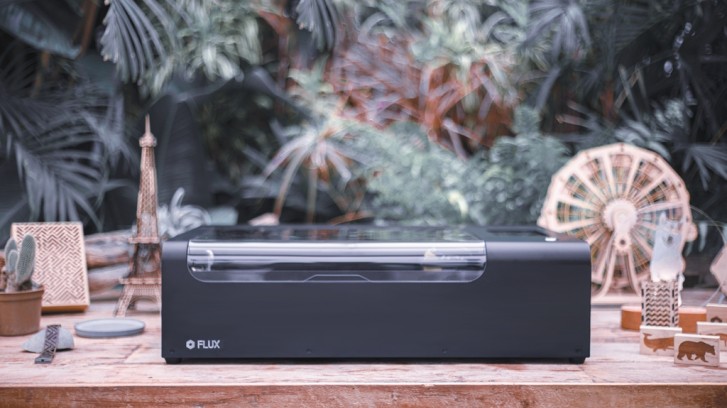
Flux Beamo review

Having spent some time with the Beamo and thoroughly tested it, we can safely say we are impressed. There is plenty of value-packed in this affordable, in relative terms, package. That being said, Beamo could use some polish to the experience in certain areas.

Hardware overview

Despite all the playful and child-friendly imagery in the PR materials, Beamo is not a toy and definitely shouldn't be treated as such. There is certain user-friendliness to enjoy about Beamo, but not any room for carelessness. No laser that can cut though actual materials is to be taken lightly. There are safety precautions and rules to follow. Protective eye wear and ventilation to consider.

Things are a little bit more complicated than simply - "don't stare at the bright light". That is kind of the main point that Flux drives home pretty thoroughly in its instructions.

Flux Beamo review

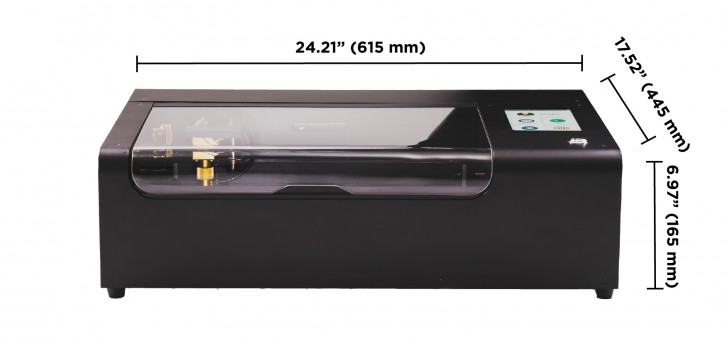
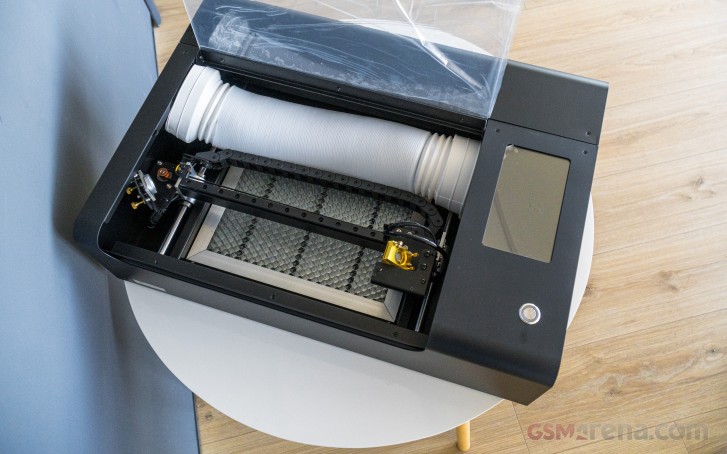
If reading 30W on the specs sheet isn't enough to keep you on your toes, the thick metal casing and industrial-sounding fans of the Beamo should convince pretty much anyone that this isn't a toy. It is built like a tank, its 615mm x 445mm x 165mm body made out of bent thick metal. It has that confident industrial look and feel to it without really looking bad.

Flux Beamo review

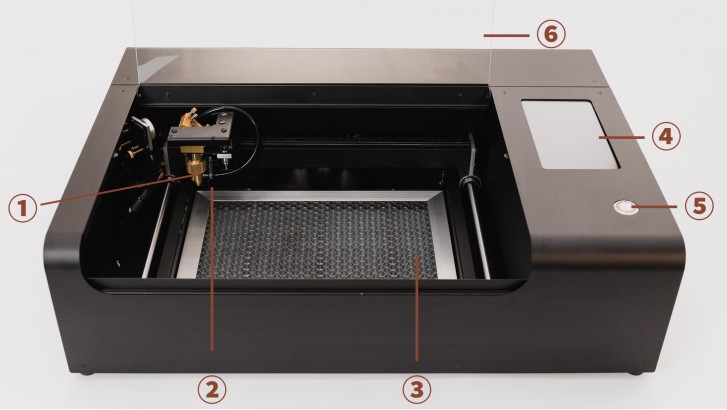
The working area is covered by a big bent acrylic piece that provides ample visibility (not that you should really be staring in) and easy access to the internals. Inside there's a huge honeycomb pattern grate that is meant to support whatever you are working on, while also providing enough distance from the bottom of the unit to defocus the laser beam enough so that it doesn't damage the bottom plate. Our best guess on why Flux went with a thin honeycomb pattern is that it's geometrically unlikely to get in the way of most common engraving shapes. In any case, it is really sturdy.

Flux Beamo review

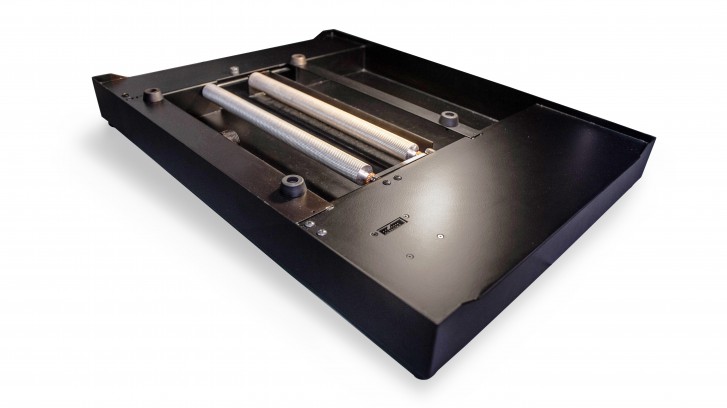
The Beamo lets you detach the bottom along with the grate and place the unit onto a bigger working area so you can engrave larger objects over several runs. That sounds neat, but we didn't really get to test it since we don't really have huge surfaces suitable to engrave around the office, nor the required ventilation conditions to accommodate such an operation indoors.

Plus, Flux might not even include said feature in the US, since it might create some potential health concerns for classroom use. Either way, the default working area of 300mm x 200mm was big enough for our (and probably most others') needs. Our main gripe is the 45mm height allowed really isn't enough for some of the stuff we wanted to engrave.

Flux Beamo review

Moving on to Beamo's cooling and ventilation systems. All the actual guts of the machine and most notably the big CO2 tube are cooled by an internal water loop and that just tickles our inner-geek the right way.

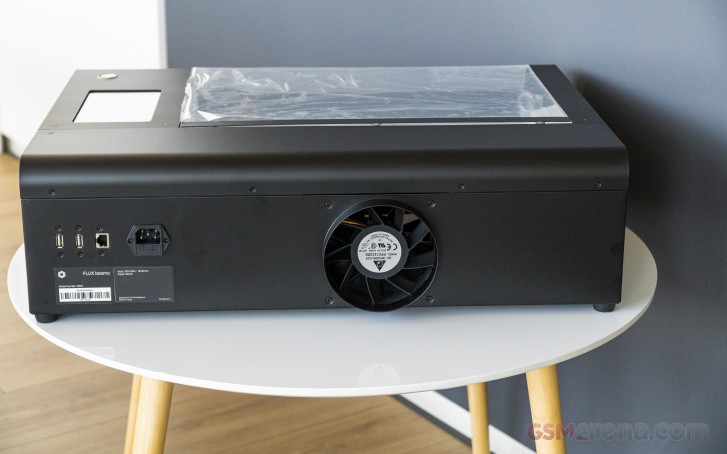
The Beamo is loud, really, really loud, mostly due to the huge fan strapped to its back side. That's the exhaust, which you are expected to route somewhere outside the room. Flux even provides you with a flexible plastic tube and the bracket and tool to secure those to the back of the Beamo. Definitely don't skip this part, since otherwise you can create a breathing hazard in the room or even worse if you are working with something like carbon fiber. See, we did our homework!

That fan is pulling double duty. On the one hand it creates a massive airflow and positive air pressure while the machine is working to clear any dust, particles and smoke away. On the other hand, some of the air also gets routed in a nozzle near the business end of the CO2 laser, which helps with fire-prevention.

Actually since the laser is effectively burning material away, it's more of a fire containment procedure, since fire is expected. Not really open flames, though. The manual has a few pretty hilarious, yet jarring paragraphs on that topic. Keep a damp towel nearby and don't really leave the room, being the gist of things.

Flux Beamo review

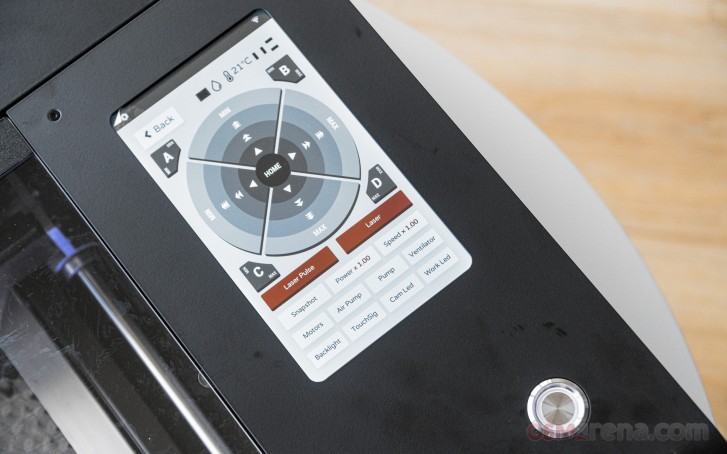
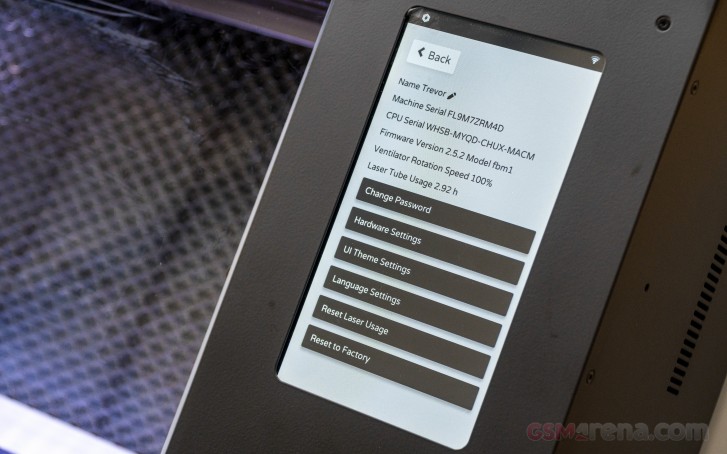
You get a single very satisfying and reassuring power button. You can always use that to stop Beamo in a hurry. Lifting the acrylic cover also cuts-off the laser on a hardware level, which we definitely appreciate, since the abort buttons on the integrated touch screen and the remote software can get stuck at times.

Flux Beamo review

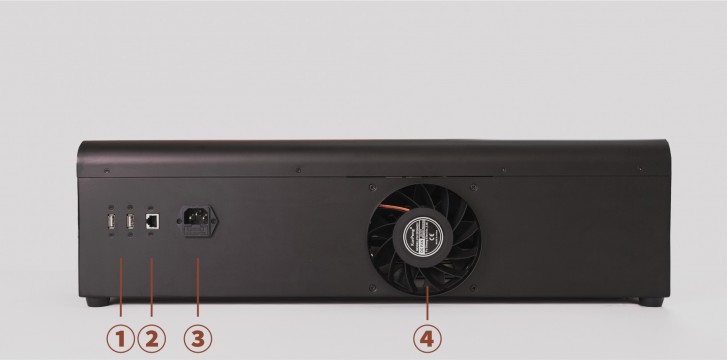
On the back of the Beamo, we find that powerful fan we already mentioned, along with a standard power socket two USB ports, one of which is meant for the bundled Wi-Fi adapter, as well as an RG-45 port for Ethernet so you can connect to the device in whichever way works best for you.

Features and capabilities

So, impressive hardware and aggressive pricing - also check. But, what can you actually do with the Beamo? Well, plenty, actually. Most of it with impressive ease, compared to pro solution.

Yet, we might have just over-hyped Beamo slightly in our original article[1], back when we first leaned about it. To be fair, though, some of Flux's advertisement was rather unclear on this end.

Flux Beamo review

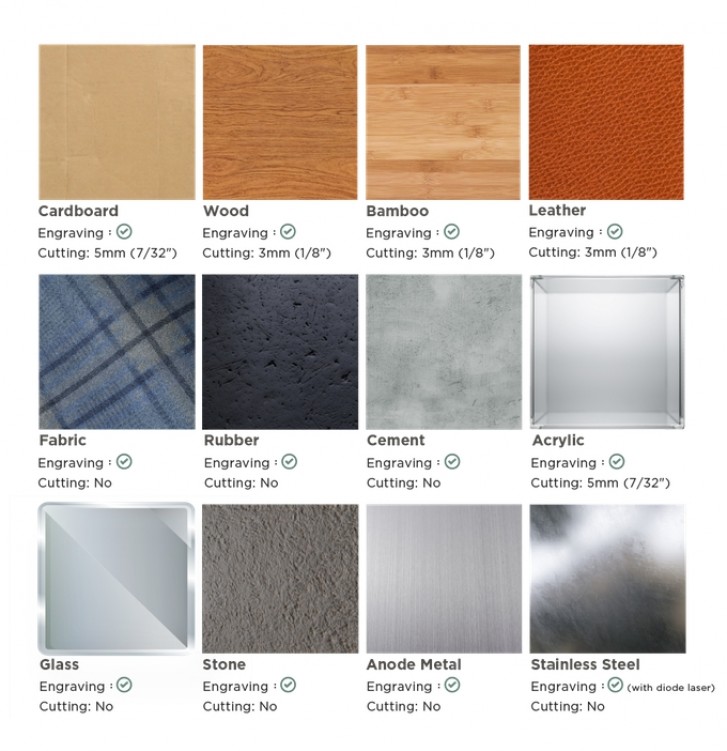
Long story short, Beamo is an engraver first and foremost and can very rarely serve as an actual cutter. In its default setup, the 30W CO2 laser does well with carving things with an impressive level of precision and resolution. Actually cutting them rarely works great. Even things like wood and thick cardboard are kind of unpredictable when it comes to actually trying to cut all the way in.

Also we metal isn't a friend of the Beamo even for carving. You can easily take the coating off of something like a brushed aluminum piece, but carving out bare metal is a no-go.

It's just that in its nature, a CO2 laser is better suited for some tasks and less than ideal for others. Flux recognizes this and promises an optional add-on accessory for Beamo, which essentially straps a semiconductor laser to the machine. That one should have what it takes to work on metal.

Flux Beamo review

Since we are already on the topic, other optional add-ons for the Beamo, which should be made available at some point include a different bottom that lets you work with rotating objects. This is meant for engraving things like cups and also increases the maximum height of the engraved object to 105mm. That's one bit we would really like to try out at some point. Another add-on Flux mentions is one that enables autofocus on the laser. Pretty nifty, since the current setup is prone to error.

Flux Beamo review

And what better time to explain how focus on the Beamo works in its current state. Taking a small step back here, it might be beneficial to provide a simple explanation of how the CO2 laser actually gets guided to its target.

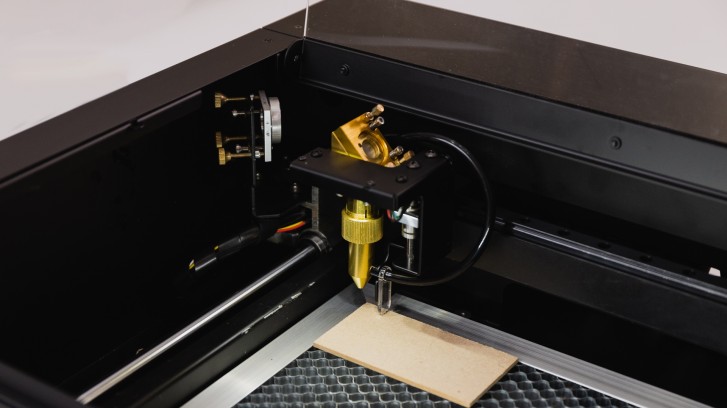
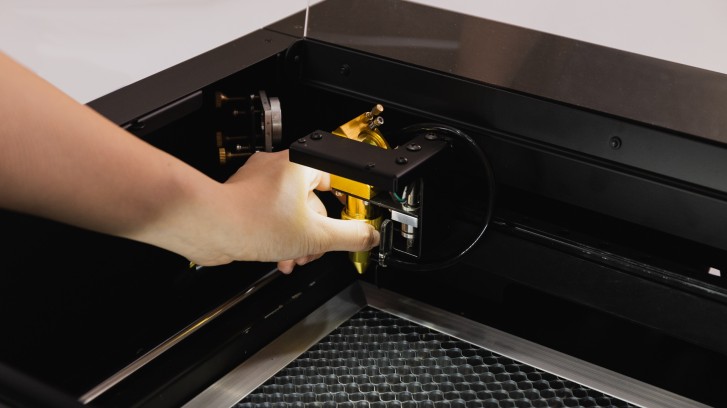
The actual CO2 tube is concealed in the top part of the unit. From there fires the laser beam into a set of two mirrors, which move about to hit the set X and Y coordinates. One is mounted on the side, while the other is part of the nozzle assembly that is being floated about the working area. The final piece of the optical puzzle is you using a rather rudimentary, but still functional system to focus on the Z axis.

Flux Beamo review

First you bend a piece of acrylic down from the air house on the nozzle. Then you loosen the metal ring around the nozzle, which allows you to slide the entire assembly up and down. You do so, accordingly, using the acrylic piece as an anchor point. Then tighten things back up, bend the acrylic up and you are done.

Clearly something that could be automated, like Flux is apparently doing with an add-on. Yet there will be added costs to that. It could very well be worth it, though, if that enables variable depth carving, which doesn't seem to be a thing right now. Right now you are limited to some shading, which we had mixed results with.

Imperfect camera preview

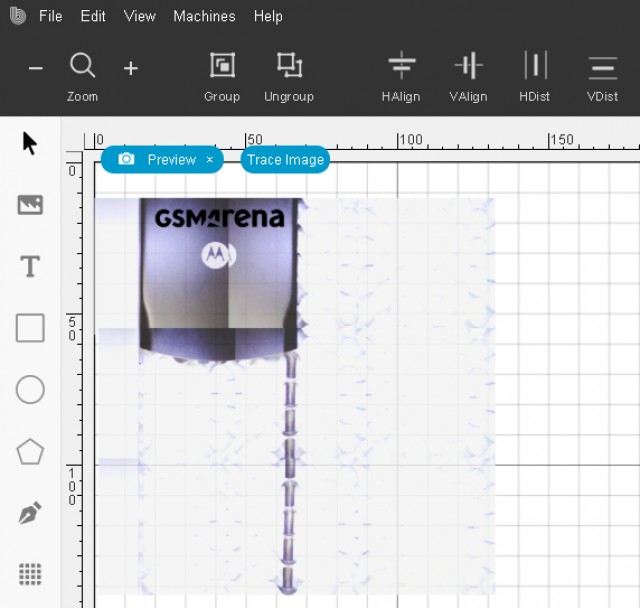
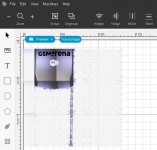
As for guiding the laser on its X and Y path - that is Beamo's job and one it does pretty well, moving that laser beam around at up to 300 mm/s. That's one advantage of CO2 lasers over semiconductor ones - speed. Having said that, you do need to go much slower to achieve results with certain materials. The actual positioning bit is done via a camera that is mounted next to the laser nozzle.

It generates a grid of (sometimes imperfectly stitched) images and shows you the item you currently have in the machine. Then you can simply drag, drop, resize, group, layer and many other things the cuts and groves you want to make. It's really user friendly and lets you start producing decent stuff in no time.

Like we already mentioned, though, the system is not perfect and besides poor image stitching, there are also issues with finding the boundaries of your actual working area. Flux could have definitely done a better job marking those out physically inside Beamo. The top segment of the honeycomb grate seems to be unreachable, as well as some of the farther corners. We found that placing objects a bit closer to the center of the inside area worked best for us.

Results showcase

Before we move on to the software and workflow side of things, where some of our most serious gripes with the Beamo reside, we felt like we should show you some of our creations and experiments first, just so you can get an actual idea of what to expect.

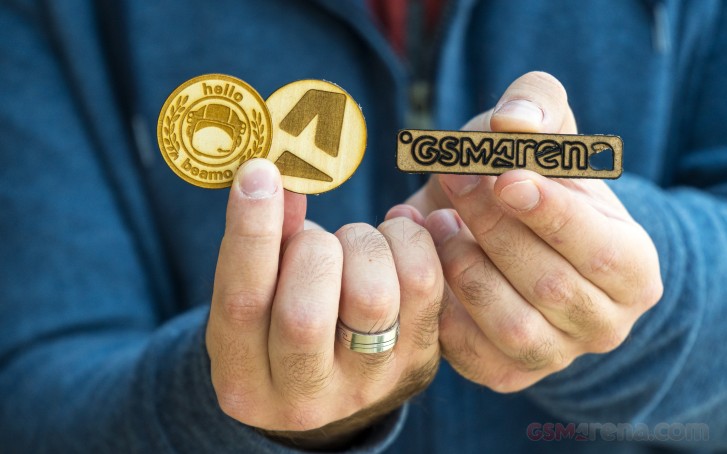
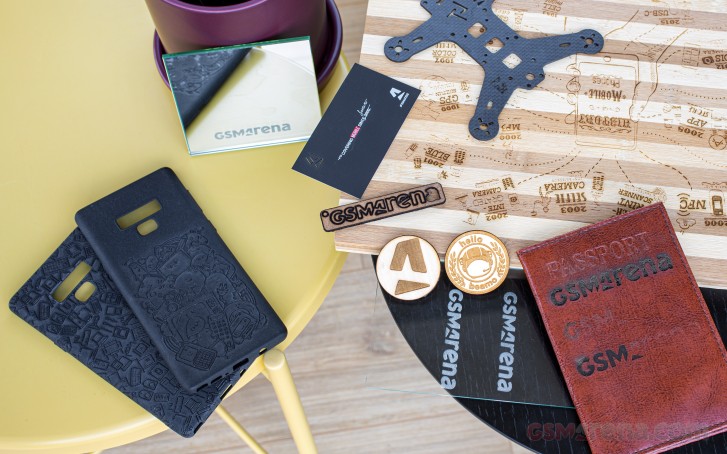
Wood is a great place to start as it's a material the machine works with pretty well. That being said, you do need to take extra care to fine-tune your power and speed parameters for the each particular wood type, composition and thickness. This is even more important if you want to do full depth cuts. Those can be hit or miss and you definitely want to set the Beamo for more power and an extra pass or two, rather than be conservative about it.

Engraving, on the other hand works better with a lighter touch, otherwise you end up with more black burn paths. The good bit here being that you can use layers to make certain paths deeper and others softer, as needed. Plus, vinegar with a paper cloth is surprisingly effective at cleaning wood burn residue.

Flux Beamo review

Like we mentioned earlier, the Beam studio software comes with a set of convenient presets for different material cutting and engraving. The latter comes in two variations for certain materials - monochrome and shading. It looks deceptively simple within the software, you just import and image with different colors, flip a switch, which makes to software stop re-interpreting everything as black lines and you are good to go.

When Beamo reaches a line that needs to be grey, it will dial back its power accordingly. In our experience, it was pretty difficult to actually pull off good results with shading. The Beamo was clearly working as intended, but the input images we selected weren't quite suitable and we found that you have to carefully preparing your input image, selecting distinct enough shades.

Especially if you are converting something like a photo. Take your time, experiment and definitely follow one of the many tutorials online for properly preparing a photo for engraving. It matters a lot. The big cutting board below has shading in certain areas, which, frankly, ended up spoiling the end result more than helping, since it was our first try.

Flux Beamo review

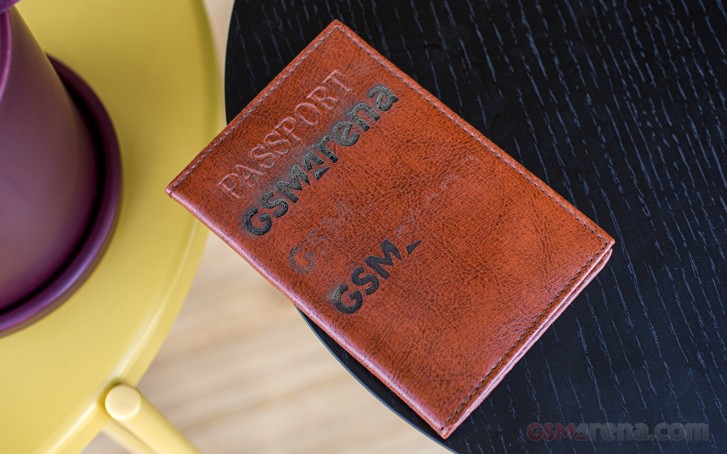
Another material that supports shading as a preset in the software is leather. We had just as hard of a time trying to get that one right though. The passport holder we sacrificed for this experiment has a solid logo burned in monochrome mode first, followed by two shaded versions of our two-color logo at increasing intensities. Flux Beamo review

Clearly, we never quite managed to get it right. Judging by the first engraving, leather is pretty tricky to work with, since it definitely benefits from a lighter tough, or rather gets drastically worse if you go too far. All the while, going to soft on it does little due to its surface strength. A fine balance indeed.

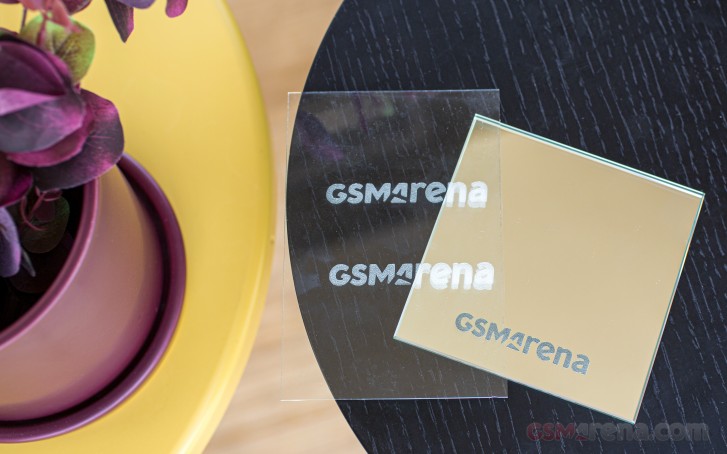
Glass works out surprisingly well. You get this nice dot pattern effect in the final engraving, which can really show off the amazing resolution Beamo has. Tweaking the power parameter of the glass preset has a very direct and tangible effect on the depth of the carving. Results look even better and more professional on a mirror engraved from the back side.

Flux Beamo review

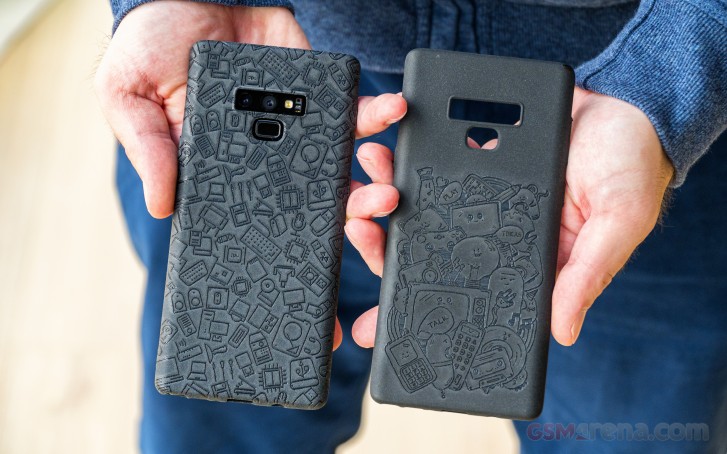
After from wood, though, our biggest success story was probably rubber. Beam studio has a preset for that as well and while it doesn't support shading, its simple monochromatic output works really well on the phone cases we tried. Again, you can really see the amazing fine resolution Beamo can achieve. Flux Beamo review

Plus, there is plenty of room in the spacious working area to pull something off like an overlapping pattern and cover the entire case top top to bottom. Beamo's design meant we didn't have to worry too much about going outside the lines, so to speak. We think the results speak for themselves.

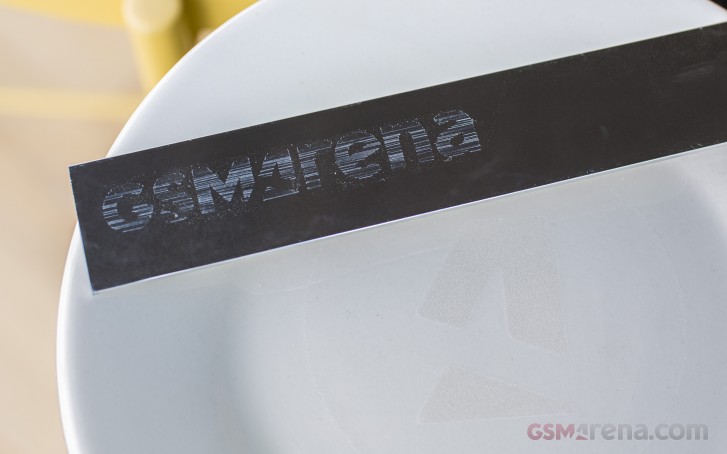
Like we said earlier, though, Beamo definitely has its limitations. Beyond the rather frustrating height constraints, some materials just didn't submit to the power of the CO2 laser. Metal proved particularly tough, as expected. The vanilla Beamo laser can barely scratch stainless steel. Flux Beamo review

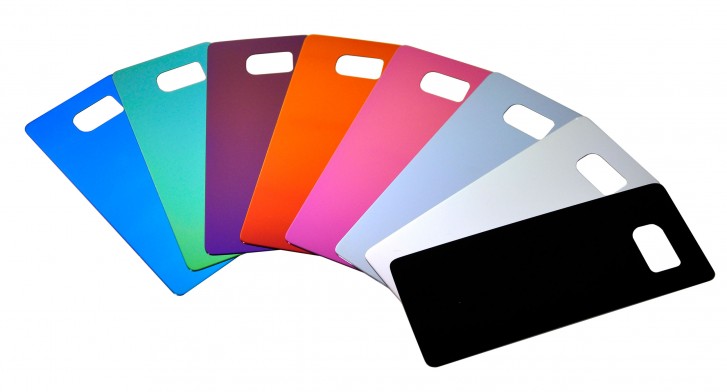
Anodized metal with a coat on top, like the back plate of an old Motorola RAZR V3[2] we had at the office worked out pretty well, though. So, a mixed bag. We also tried engraving a plate we bought from the dollar store (so likely not ceramic). The laser did take a few layers off that, but due to the color of the surface, the effect was less than impressive.

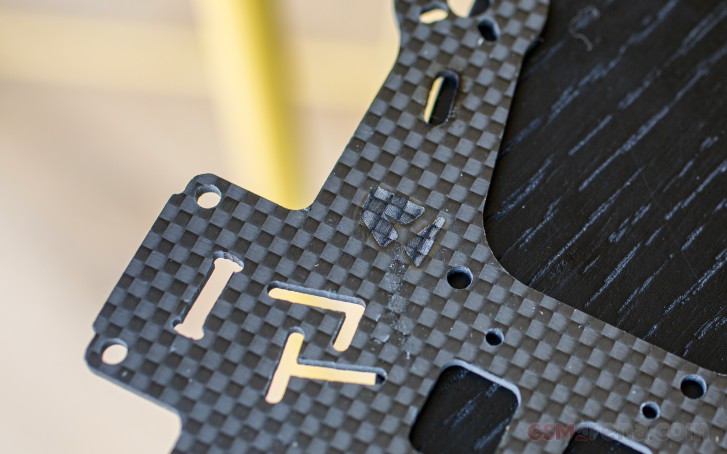
We even tried a carbon frame from a small racing drone and that had the same issues as the plate. Layers did come off, but the nature of the material made the grooves hard to spot. We definitely would not recommend working with carbon fiber for another reason too - it had us scared on a few levels. Flux Beamo review

First, there was the fear of microscopic glass fibers getting on skin, or worse, being inhaled. Plus, this is probably the only material that produced sparks while Beamo was working on it. Likely glass being incinerated. Pretty, but also quite scary.

We put together a small video of Beamo at work on different materials. It is sped-up quite a bit in most segments, since engraving is generally a pretty slow process. Beamo is nice enough to give you an exact calculation of how long each of your projects will take. The number varies wildly with size, complexity of the job and material, preset, power and speed of the laser. We had tasks as short as a minute, whereas the cutting board took over 45 minutes to complete. Pretty understandable, given that we basically filled up Beamo's entire working area.

Operation and ease of use

Software is definitely the make or break aspect of a product like Beamo which basically aims to offer pro or near pro-grade functionality to a broader user base so things need to be easy and straight-forward. Those two Flux has basically nailed.

The only issue we had was with the initial setup - our advice is to just grab the Beam Studio app and not the Flux app, since the former works and the latter does not, despite what the description on the Flux website says.

Unfortunately, where Flux kind of dropped the ball on with its software is polish. To be fair, this could be partially down to the still early nature of the product and hopefully some of the more annoying issues like unstable connectivity and misbehaving camera preview will be patched. In its current state, though, there are some notable issues.

Currently, the basic workflow with Beamo has you picking out, capturing or drawing a suitable stencil, pattern or image and importing it into Beam Studio. Yet as we mentioned, some extra steps need to be taken to prepare some images for engraving, especially color photos. And for the most part Beam Studio does not take care of that part of the process.

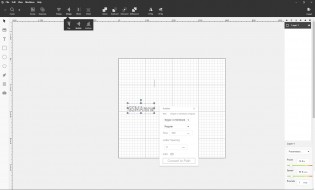
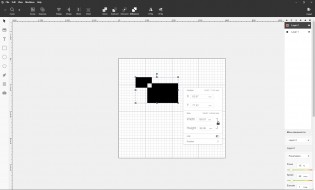
You could, of course, decide to compose an image entirely inside Beam Studio as long as you keep things simple and stick to three basic geometric shapes, rotations, corner rounding, as well as text with a selection of fonts.

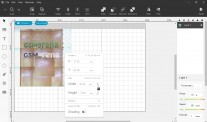
Basic editing and creation options in Beam Studio Basic editing and creation options in Beam Studio
Basic editing and creation options in Beam Studio

To the company's credit, Beam Studio does offer a surprisingly robust layer system, like the one you would find on good image editing software. It works pretty well for selecting different speed and power parameters for different cuts and patch within your final creation. Those, by the way, are housed in the lower right corner of the UI as sliders, along with an execution counter.

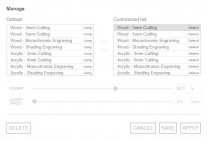
Parameter presets Shading Camera preview
Parameter presets • Shading • Camera preview

Above these is the preset menu. In our testing, most of the default items on the list worked out pretty well. Once you start experimenting for yourself, you can add more custom ones to the list, which we found very useful.

With the image prepared and properly layered with parameters and presets tweaked for each layer all you need to do is engage the camera preview, select a patch of the working area you want previewed and potentially give it a few tries since the photo snapping and stitching is not exactly reliable.

Then you line things up, press export and leave Beamo to do its thing. You can use the Beam Studio to monitor the progress of your task, as long as the connection does not drop, which does happen from time to time. There is even an option to engage the on-board camera for a real-time feed while Beamo is working. Unfortunately, it is positioned in such a way that you always see a bit below the actual laser hitting point so it is a bit useless.

Since looking at Beamo working with no eye protection is not advisable and, let's face it, you will want to look, we believe setting up a separate streaming camera solution is the best way to go.

Flux Beamo review

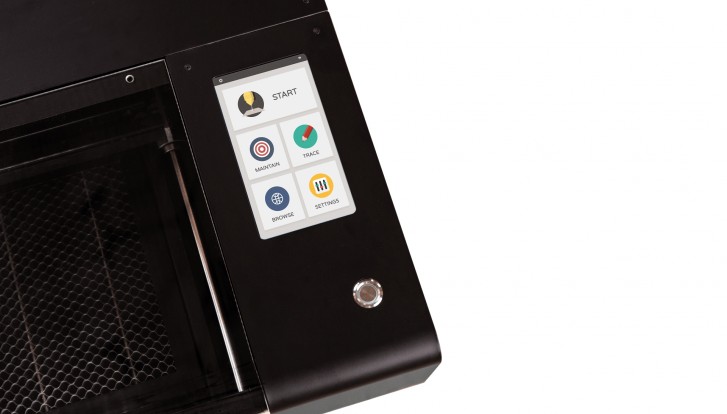
As per Beamo's press materials, there are ways to engrave without Beam Studio. Well, sort off, since the Trace option on the built-in touchscreen UI is currently not implemented. Just like the browse option, which, presumably, will give you quick access to an online repository of stencils, patterns and images for carving. Something that beginners will definitely appreciate. Hopefully, that gets updated in soon.

What you can currently do, however, is export you Flux task from the Beam Studio and then load that on a USB drive and get it to Beamo that way. Not ideal, but it's at least some flexibility.

Flux Beamo review

What we elected to do instead during our testing is to dedicate a small laptop as a workstation next to Beamo to initiate tasks conveniently. For any more complex work within Beam Studio, we simply used a regular PC workstation and the convenient .bvg scene saving format Beam Studio supports to transfer projects from one PC to the other. We can only imagine this format will be incorporated in any future mobile app Flux builds for Beamo.

At the time of writing, the company only has an Android app available for the Flux Delta. Judging by some of the press material, a Beamo mobile app is probably on the way as well.

Flux Beamo review

And that pretty much sums up the current software state of Beamo and our general feelings towards it. The groundwork is there and shows a lot of promise. It is usable in its current state, but with some frustrations - mostly that all the creature comforts and user-friendly enhancements are hinted at or in some state of readiness, but no quite there yet.

Various considerations and final thoughts

To be perfectly frank, we have a rather limited frame of reference when it comes to the Flux Beamo. For us, personally, it constitutes a big upgrade over the small, entry-level 2W red laser engraver we also have kicking around the office. And while much more capable than that Beamo is definitely not professional-grade equipment.

Still, it comes close and going by our personal research on the laser engraver niche, it offers quite an impressive package at a competitive price point.

Flux Beamo review

As such, it Beamo really does seem to strike a great middle ground. It's not too bulky, yet big and flexible enough to accommodate most common use cases. It's not overly powerful, but definitely not lacking. Feature-complete, but not overly complicated. Really, the main gripes we have with Beamo have to do with the lack of polish in certain aspects of its software and perhaps the partially unclear nature of some of its advertising materials.

If you do find yourself considering Beamo or a laser engraver in general, we hope our observations will be of use. And here's another potentially useful bit -there is maintenance to consider - another piece of rather obscure information.

Flux says that cleaning the lenses on Beamo should be a weekly task. There is also rail lubrication and water level in the cooling system to monitor. Do all this correctly and Beamo should last you about 6 months to 1 year on its factory CO2 tube. After that, you will have to hit-up Flux for parts. Pricing and availability for these is not yet confirmed.

Flux Beamo review

What we're getting at here, yet again, is that Beamo is not a toy nor is it really an advisable impulse purchase just to have. It's a specialized tool, crafted and offered in a noticeably more user-friendly manner. That being said, we feel like Beamo would make a great addition to any small shop or specialized classroom.

References

  1. ^ original article (www.gsmarena.com)
  2. ^ Motorola RAZR V3 (www.gsmarena.com)


from GSMArena.com - Latest articles https://ift.tt/2QM3Fn9
Read More

Post Top Ad

Your Ad Spot